
The Griffon Alert text messaging and e-mail system is designed to enhance and improve communication so that all members of the Missouri Western campus community (students, staff and faculty only) can stay informed in the event of an emergency that affects all or part of the campus.
Already have an account? Current users can login to update your information, add or change your e-mail address, or unsubscribe. Click here for user login.
GRIFFON ALERT IS COMPRISED OF:
The system will be used only for emergency contact purposes. Griffon Alert text messaging and e-mail will not be used to distribute advertising or other unsolicited content. Please note that subscribers to Griffon Alert text messaging and e-mail will pay no fees for the service, other than any regular fees associated with text messaging services.
Signing up is quite simple! Here’s how:
- Click “Sign-Up Today”
- Logon with your Missouri Western e-mail username and password.
- Follow the directions on screen.
- Be sure to have the mobile phone you want to receive messages from when you sign up, as you will need it to enter a confirmation number.
- Reminder: You are responsible for messaging charges by your service provider.
Already have an account? Current users can login to update your information, add or change your e-mail address, or unsubscribe. Click here for user login.
Before You Register:
- This service is completely voluntary and available only to the campus community. You may opt-in or opt-out at any time.
- You are responsible for messaging charges by your service provider.
- You will not receive messages for which you did not register.
- Your information is not shared with nor sold to third parties.
When Griffon Alert is activated, voice messages are sent to specified phones within each department on campus and to selected key personnel phones. The voice messages will deliver a similar message to that sent to those who’ve signed up for the text message and e-mail alert portion of Griffon Alert. Faculty, staff, student staff and persons receiving the voice alerts should re-think the way we answer our phones. Because this system is computer generated, there are initial and other delays when receiving the message. This is much the same as telemarketing programs that many get accustomed to hanging up on. If you are answering a phone that could receive a Griffon Alert message, the message will have a long pause and then state “Griffon Alert”, pause and then the message will be heard. The system will also ask for you to acknowledge receipt of the message by pressing the # key. When answering a listed phone, be patient, wait for the message and acknowledge.
Alert Beacons with voice annunciators are located in the halls of most buildings at Missouri Western.
When a message is being delivered, the beacon will light up with flashing lights and an emergency sound will be emitted from the beacon to gain initial attention. After a brief time, the sounder volume will decrease allowing a voice annuciator above the beacon to be heard. The message being delivered will be heard from a digitally produced voice. The message will also be displayed in text form on an LED screen located on the front of the beacon.
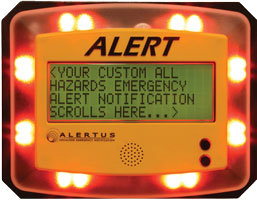
LED Screen on Beacons
Whenever an alert message is being delivered through Griffon Alert, several white outdoor strobes will be triggered. These are located on the outside of campus buildings to indicate to outdoor occupants that some type of warning is being issued and that they should investigate further.
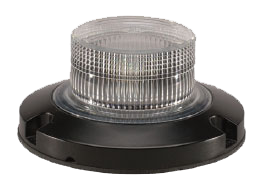
Light Strobe
GRIFFON ALERT WILL BE USED FOR:
- Tornado warnings
- Bomb threat and other emergency evacuations
- Active shooter on campus
- Shelter-in-place due to outdoor hazards (e.g. Hazardous material spills)
- Campus closing and classes canceled due to weather or other circumstances
- An all clear declaration
- Testing of the system
GRIFFON ALERT WILL NOT BE USED FOR:
- Daily minor emergencies
- Fire evacuations (systems exist in all public buildings)
- Advertising
- Promotions
- Personal messaging
Emergency actions requested by Griffon Alert should be followed by all faculty, staff, students and visitors until an ALL CLEAR is issued. All components of the Griffon Alert System will be used to announce the ALL CLEAR for any major emergency.

Frequently Asked Questions
Griffon Alert is a messaging system that allows Western to communicate with members of the campus community quickly in the event of an emergency that affects a number of campus community people or facilities.
Omnilert is the company that is contracted to provide the Griffon Alert system. When you sign up for the Griffon Alert system, you will be directed to their website for part of the process.
Griffon Alert system can send messages to any device that can receive text messages through cellular service, such as cell phones, text pagers, BlackBerrys, and some wireless PDAs. In addition, you can also opt to have the messages sent to your personal e-mail address. Your Missouri Western e-mail address is automatically added by the system.
The university has created a well-defined set of situations that would prompt a Griffon Alert message. Griffon Alert will only be activated when there is a critical need to transmit urgent information to the campus community. Here are some examples:
- Ongoing safety threats in which an armed or dangerous criminal is at large on campus.
- Major facility emergencies or evacuations. This may include a large scale gas leak, fire, or hazardous material spill, occurring either on campus or near enough to campus to cause a credible threat to members of the campus community.
- Severe weather or illness. This may include a threat from a tornado requiring those on campus to take shelter or an outbreak of widespread illness on campus.
- Timely notification of crime. Though not all on-campus crime incidents will be reported via the GRIFFON ALERT system in addition to the Missouri Western Police Department’s usual methods, those that represent a possible threat to campus safety will be communicated through GRIFFON ALERT.
Due to the limitations of text messaging, Griffon Alert messages will be very brief and contain vital and immediate information. More information about a Griffon Alert message will be made available through the other forms of communication available to the university, including messages posted to www.missouriwestern.edu, broadcast e-mails, and announcements to local media. More information can also be found on the Missouri Western Police Department Web site at www.missouriwestern.edu/policedepartment.
No. Griffon Alert will not be used to deliver any kind of advertising content, and mobile numbers will not be shared with any third parties.
Common Problems and Solutions
Having Troubles with Griffon Alert?
Here are some common problems and solutions.
My Login Doesn’t Work
Possible Solution: If your e-mail username (your e-mail address minus the @missouriwestern.edu) and password do not validate, you may be using an incorrect password. For username and password assistance, contact the IT Help Desk at (816) 271-4555.
I Never Received my Validation Code
Possible Solution #1: Did you enter your complete phone number including the area code (i.e. 10 digits)? The system needs your complete phone number to deliver messages.
Possible Solution #2: Test your cell phone to see if it can receive text messages from Omnilert. Make sure you enter the area code along with the phone number, and make sure you pick the correct carrier.
Possible Solution #3: Have a friend try to send you a text message. If you do not receive it either, check with your service provider.
My Carrier is Not Listed
Possible Solution: Some carriers, especially some of the prepaid services, do not allow their customers to receive text messages, even though they may be able to send messages. Check with your service provider to see if you are capable of receiving text messages. If you can receive text messages and your carrier is not listed, you can contact e2campus (the vendor for the Griffon Alert system) and request that they add support for your carrier (1-800-936-3525 or e-mail: info@e2Campus.com).
I Signed Up to Receive E-mail from Griffon Alert but I Didn’t Receive the Test Message that was Sent Out
Possible Solution #1: Check to make sure your e-mail account has been validated. Login to your Griffon Alert account, then click on “services.” Your e-mail account should be listed along with some indication of whether it still needs to be validated. If it has not yet been validated, follow the instructions on the page to complete the validation process.
Possible Solution #2: Check to make sure the e-mail is not in your “junk mail” folder. Most e-mail programs allow the user to adjust settings that determine what, if any, e-mail is sent directly to the junk folder. You should set your e-mail program to always deliver e-mail from “Griffon Alert” and “e2campus@missouriwestern.edu” to your inbox. Instructions for how to do this will vary depending upon what program you use to check your e-mail.
How do I cancel my Griffon Alert services?
Login to your account and remove the desired services by clicking on “Inactivate” or “Delete” next to each service.