

How to Submit a Request
Watch our Video Tutorial
Written Instructions
| Field | Response |
|---|---|
| A: Title of Work Request * | Enter name of event |
| B: Date of Event * | Date the event is taking place |
| C: Custodial Services? * | Select Yes or No |
| D: Electrical Services? * | Select Yes or No |
| E: Grounds Services? * | Select Yes or No |
| F: Your Name, Phone Number, Email * | Enter information if it does not prepopulate |
G: Picture*
|
Attach Events Setup Template and layout
NOTE: One request can be submitted for an event with MULTIPLE locations. Include ALL locations on template, and attach all layouts. |
*Required
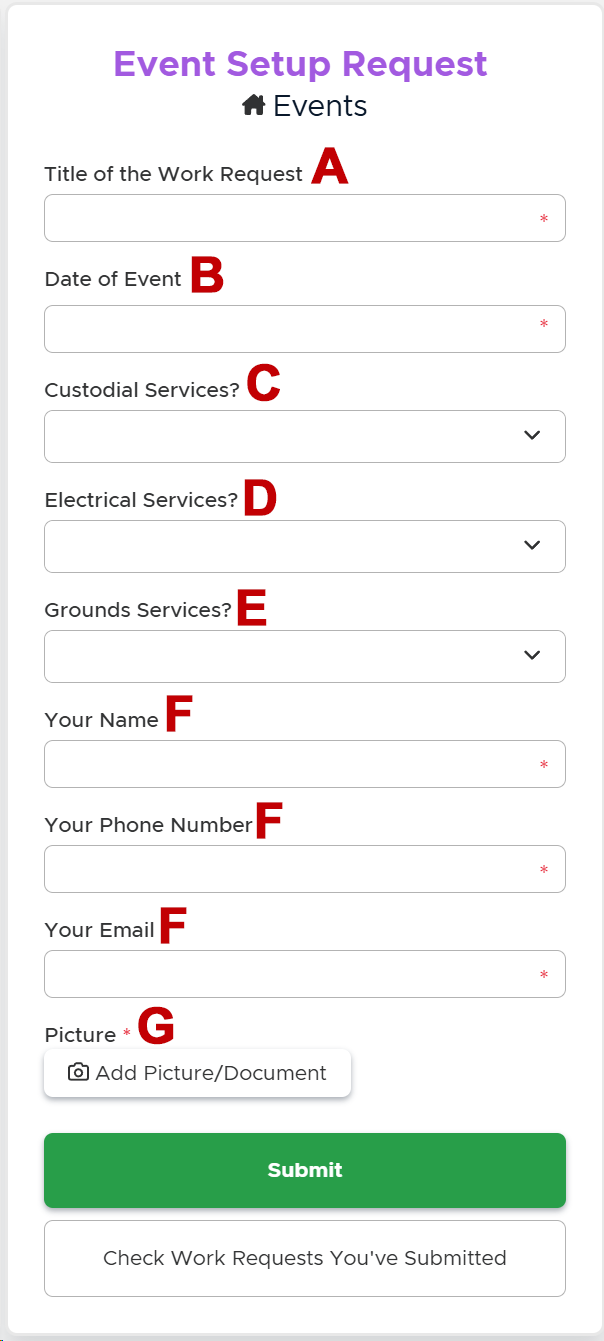
click image to view larger
How to Submit a Request
Watch our Video Tutorial
Written Instructions
| Field | Response |
|---|---|
| A: Title of Work Request * | Enter name of event |
| B: Date of Event * | Date the event is taking place |
| C: Custodial Services? * | Select Yes or No |
| D: Electrical Services? * | Select Yes or No |
| E: Grounds Services? * | Select Yes or No |
| F: Your Name, Phone Number, Email * | Enter information if it does not prepopulate |
G: Picture*
|
Attach Events Setup Template and layout
NOTE: One request can be submitted for an event with MULTIPLE locations. Include ALL locations on template, and attach all layouts. |
*Required